Managing Accounts
KEA Wallet lets you create multiple accounts to organize your funds for different purposes.
Your Accounts
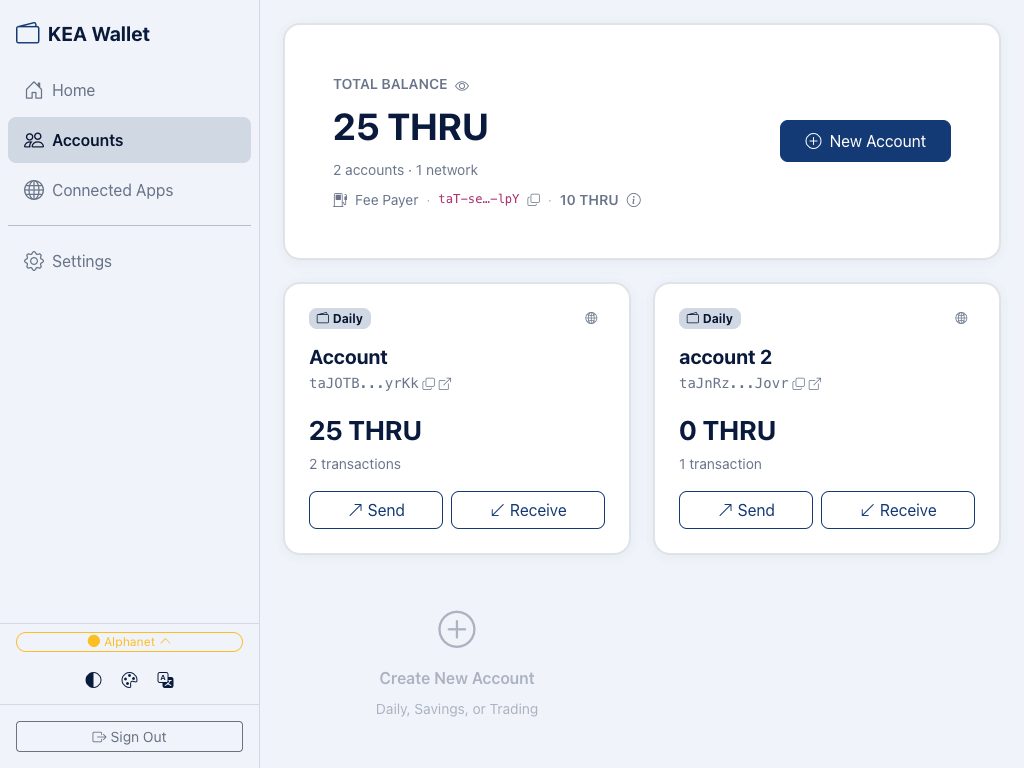
Each account is displayed as a card showing:
- Type badge — Daily, Savings, or Trading
- Account name — a label to identify the account
- Address — your Thru address (truncated), with a copy button and a link to view on ThruScan
- Balance — THRU amount held in this account
- Transaction count — number of transactions made
- Send / Receive — quick-action buttons for transfers
Account Types
When creating an account, you choose one of three types:
- Daily — for everyday transactions and dApp interactions
- Savings — for funds you don't plan to spend soon
- Trading — for active trading and frequent transactions
Account types are labels for your own organization. They all work the same way on the Thru blockchain — there are no restrictions based on type.
Creating a New Account
- Go to Accounts.
- Click New Account (top right) or the Create New Account card.
- Choose a type: Daily, Savings, or Trading.
- Your new account is ready immediately with its own unique address.
Selecting an Account
Click any account card to select it. The selected account determines:
- Which account is used when a dApp requests to connect or sign a transaction
- Which address the dApp sees
Each account has its own address and balance — dApps only interact with the account you've selected.
Fee Payer
The Fee Payer is a special address that covers network fees for all your accounts. It's shown at the top of the Accounts page with its own address and THRU balance.
- Network fees on Thru are near zero, but the Fee Payer still needs a small THRU balance to process transactions.
- Keep it funded so your sends go through.
- The Fee Payer is backed by your 12-word recovery phrase. See Security for details.
Viewing on Explorer
Each account card has an external link icon. Click it to open your account on ThruScan, the Thru blockchain explorer, where you can see:
- Full transaction history
- On-chain balance
- Transaction details and confirmations
Coming Soon
Account renaming and account deletion/hiding are not yet available but may be added in future updates.
What's Next
- Security — How each account is protected
- Sending & Receiving — Transfer tokens between accounts or to others